
How do I prepare a CSV for AI without sharing unnecessary customer data?

Prepare a separate export containing only the fields needed to answer your question, inspect its actual contents, and use only an approved analysis destination. Do this before uploading the file. Asking a cloud assistant to remove personal details from the original means the original has already been shared with that service.
For example, “Which product categories generated the most sales each month?” usually needs a different dataset from “Which customers should we contact?” A full CRM export is not the natural starting point for both. This guide proposes a preparation workflow; it does not certify a particular file as anonymous or suitable for every AI service.
What should I remove before sending a CSV to AI?
A CSV is a text table of rows and fields. Data minimisation, in this workflow, means choosing the smallest useful set of records and fields for a stated analysis. Make those choices explicitly rather than deleting only the column called “Name”.
Consider direct contact details, account identifiers, addresses and free-text notes. Notes can contain a person’s name even after the name column is gone. A precise date, location and unusual purchase can also make a row recognisable to someone with other information.
If you need a temporary row ID to check the result, create one for this export and keep any mapping to real customers separately. A reversible code is not proof that the data is anonymous. If identity is irrelevant to the question, removing the identifier entirely may be simpler.
What would a smaller export look like?
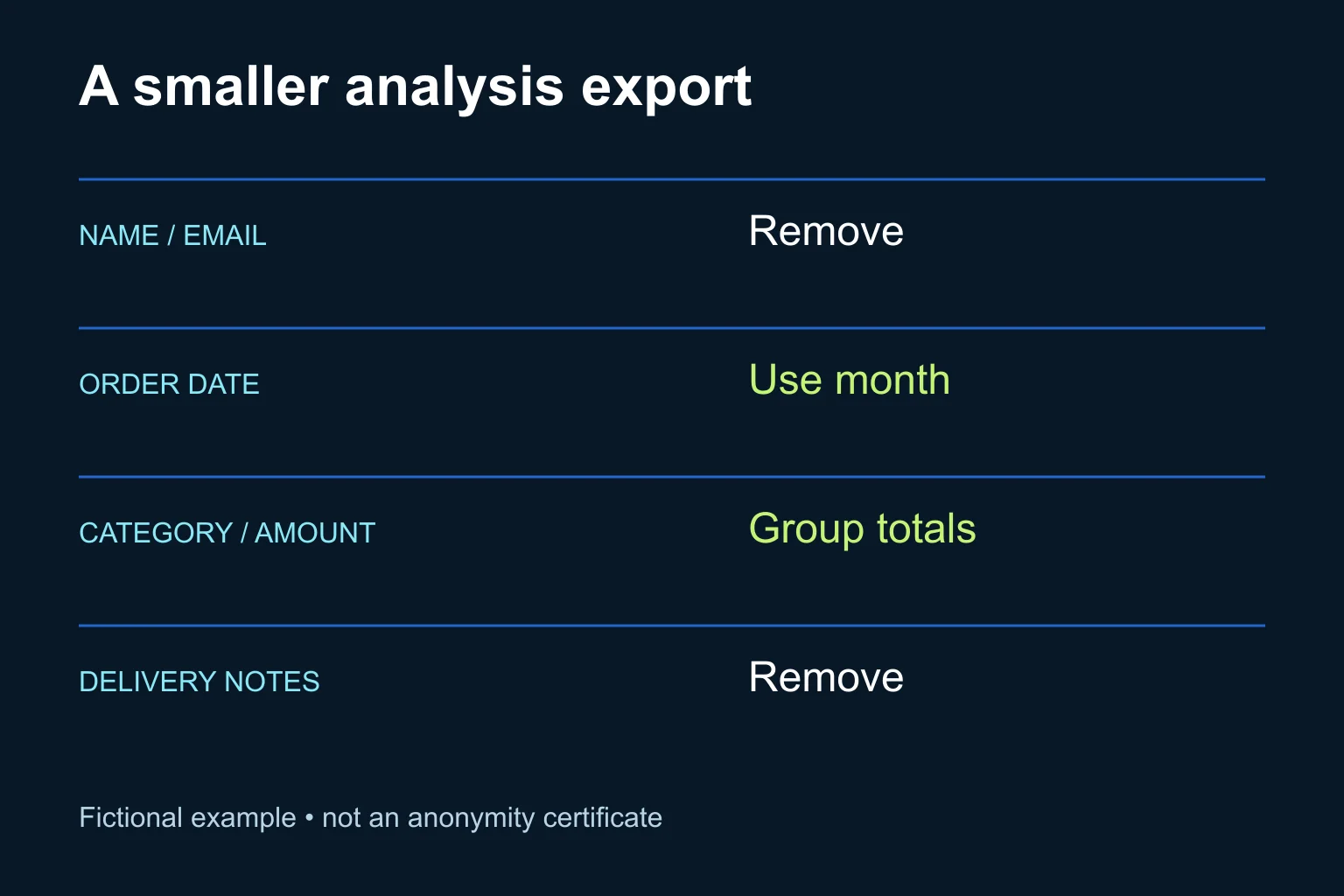
Imagine a fictional shop preparing a monthly category report. Its original export has customer name, email, order date, product category, amount and delivery notes. The proposed analysis copy removes contact details and notes, converts the date to a month, and groups the amounts by month and category inside the approved working environment.
This reduces the detail passed onward. It is not a universal anonymisation recipe: a category with one unusual purchase may still need further aggregation or exclusion. Also decide how returns, tax and cancelled orders are handled before calculating totals. Keep that business rule with the export so a later AI summary does not silently change it.
| Field | Proposed treatment for this example |
|---|---|
| Name and email | Exclude |
| Exact order date | Convert to month |
| Product category and amount | Retain for aggregation |
| Delivery notes | Exclude; not needed for the question |
The goal is a usable analysis input, not simply fewer columns. If you remove the field that distinguishes returns from sales, you can produce a cleaner-looking file with a misleading total. For the next stage, see the guide to a weekly sales report with AI.
Which preparation route should I use?
1. A manual export for occasional work
Use the export controls and spreadsheet tools your business already approves. Copy only the selected fields into a new file, apply the agreed grouping, and reopen the saved CSV to inspect it. Hiding columns in a workbook is not the same as excluding them from the file you send. This route is often enough for a small, occasional report with a named reviewer.
2. Assisted detection for free-text fields
When text must be retained, a developer can evaluate a detection tool within an approved environment. Presidio provides configurable detection and transformation components, but explicitly warns that automated detection can miss sensitive information. Its current documentation describes a community-maintained SDK, not a hosted service you can assume is already configured. Presidio overview, project FAQ.
The documented anonymizer supports operations such as replacement and removal. Those act on detected content; they do not prove that everything sensitive was detected. Anonymizer documentation. Have the developer record the package version, language models, recognizers and processing destinations used. Test Greek text and your own identifiers explicitly. These capabilities were checked on 3 November 2026; this article does not claim a tested installation or Greek detection accuracy.
3. A repeatable export pipeline
For regular work, ask for a transformation that accepts only approved columns and rejects unexpected schema changes. Give the process read access only to its required source and write access only to its intended output. Add a review step before external delivery during the pilot. A connector or MCP supplies access; a schedule determines when work runs. Neither automatically defines the fields that may leave the source.
If evaluating Presidio’s structured-data package, note that its current guide marks it alpha. Treat it as an engineering evaluation, not a promise of production readiness. Structured-data guide.
What prompt can help before I share real records?
Start with field names and invented examples. Do not paste actual customer records into an unapproved assistant just to ask whether they are safe to upload.
Help design an analysis export. Use only this fictional schema.
Question: compare sales totals by month and product category.
Fields: customer_name, email, order_date, category, amount,
order_status, delivery_notes.

For each field, propose: keep, remove, transform, or clarify.
Explain why it is needed for this question.
Flag free text, identifiers and combinations that could reveal identity.
List the business rules needed for returns and cancelled orders.
Propose checks for totals and row counts after transformation.
Do not claim the result is anonymous or approved for upload.
Do not request real records, connect to systems or send anything.
How do I check the result?
- Write the question and approved destination beside the export specification.
- Verify that the saved file contains only approved headers and records. Search retained text for known test identifiers and inspect ambiguous cases manually.
- Reconcile totals and counts against the original under the same business rules. Explain every intentional difference.
- Test the process with synthetic records containing identifiers in unexpected fields. Record missed detections and unwanted removals separately.
- Have the responsible person review the actual output and destination permissions before upload. Keep the original and any identity mapping outside the shared package.
For a recurring pipeline, a new column or a failed validation should stop delivery and create a review item. A “no matches” detector result alone should not be its release condition.
When does Ergonya help?
A manual export is enough when the question is stable, the file is small and someone can check it reliably. Ergonya helps when preparation spans systems, repeats frequently or needs maintained validation and clear ownership. Discuss an AI transformation pilot with the question you want answered and a list of field names. We can start with a synthetic sample and define the preparation steps before any real dataset is connected.