
Does your AI agent really need its own Cloud PC?
Give an AI agent its own Cloud PC when a valuable task requires using an application’s interface and a supported API or simpler automation cannot do the job reliably. I would make that decision before buying more agent infrastructure. A computer gives the agent somewhere to work. It does not tell you whether the work is worth automating.
By the end of this guide, you can choose between three routes and write a small pilot brief with a clear stopping point. The immediate reason to revisit this decision is Microsoft’s Windows 365 for Agents announcement at Ignite on 17 November 2026. Availability and documentation below were checked on 20 November.
What changed at Ignite, and what is still a preview?
Windows 365 for Agents was already generally available before Ignite. The new announcement adds Copilot Credits eligibility. Copilot Studio’s standard harness can use the computer-use tool today; its Microsoft Copilot harness preview is scheduled for December. Foundry integration is planned for preview in early 2027. On-premises access using agent identities is in preview, while persistent agent PCs are heading to Frontier private preview. These are different availability states, not one universal launch. Microsoft’s detailed announcement.
There is an important implementation caveat: the current Copilot Studio Cloud PC pool guide still labels that integration preview and unsuitable for production use. It requires an appropriately configured Entra and Intune tenant, with IT administrator involvement. Check the status of the exact integration you intend to use, not just the underlying platform. Cloud PC pool documentation.
For a business owner, my reading is straightforward: this creates a more practical option for testing work in older applications. It is not a reason to move a critical process onto a preview feature.
What does a Cloud PC actually give the agent?
A Cloud PC for an agent is a remotely hosted computing environment in which the agent can operate applications. Windows 365 provides managed machines and a session lifecycle: an agent checks a machine out to perform work and checks it back in. The environment is hosted in Microsoft’s cloud; it is not an offline copy of your employee’s laptop. Platform overview.
Think of it as a separate workstation. You still need to decide which applications belong on it, which records the agent can reach and who takes over when it gets stuck. A workspace is not a complete workflow.
Nor is an MCP connection a schedule. The connection exposes capabilities to an agent. A recurring job still needs a trigger, execution rules, monitoring and a responsible owner. Those are design decisions for your automation, not benefits that appear simply because a computer exists.
Would a connector or conventional automation be enough?
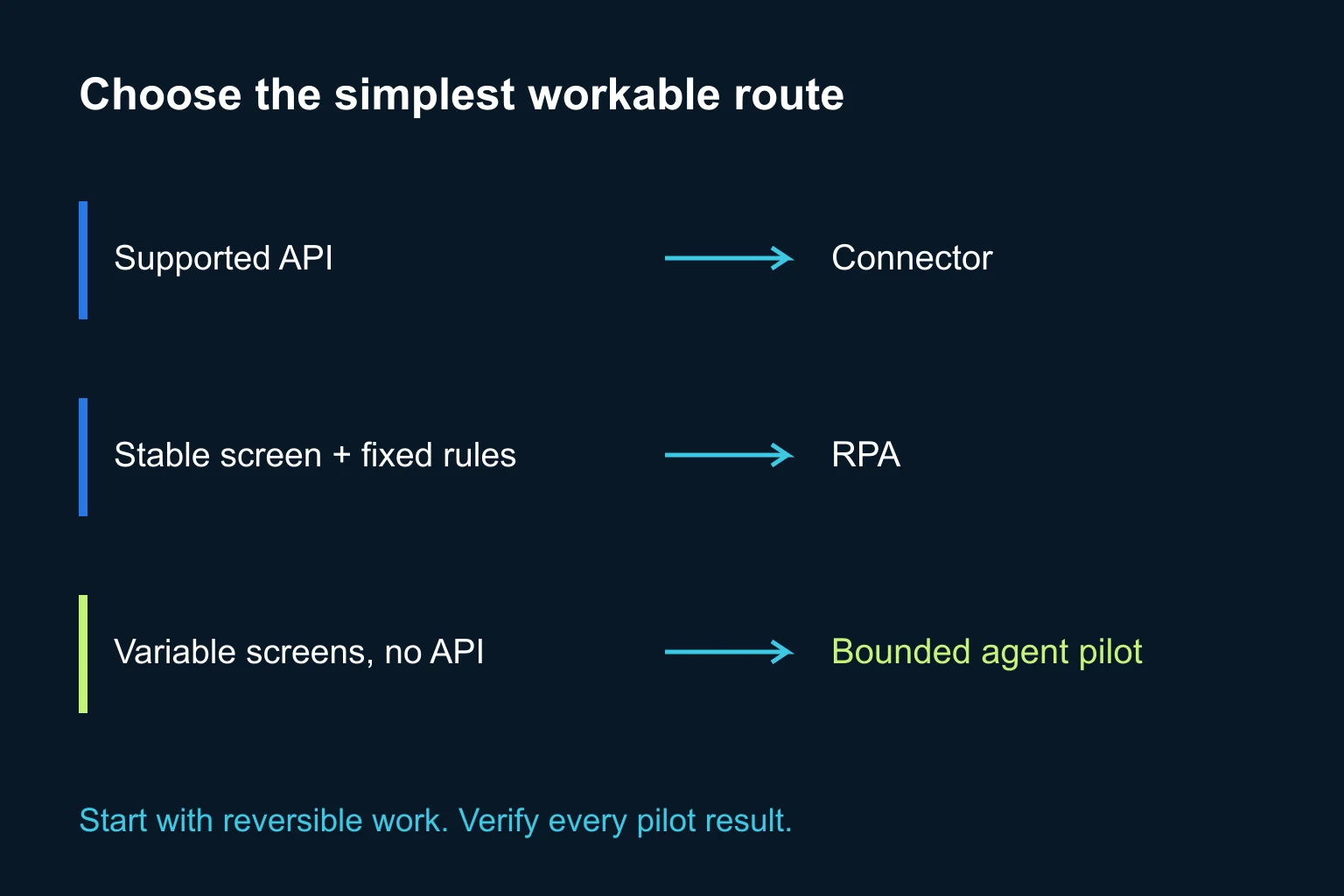
I would assess these three routes in order:
- Supported API or connector. If the application can expose the required fields and actions through a maintained integration, test that first. A structured record ID is usually easier to validate than a screen position. An existing product may already cover the whole job.
- Conventional UI automation, often called RPA. If the interface and rules are stable, a deterministic sequence may be sufficient. It still needs exception handling and maintenance when the application changes.
- A computer-using agent in a governed environment. Consider this when the task requires interpreting screens or adapting between permitted steps, and simpler routes leave a genuine gap. Start with a reversible task and measure how much human intervention remains.
This is my selection method, not a promise that one technology always costs less. A connector with poor coverage can be a worse fit than a well-controlled UI workflow. Equally, an impressive agent demonstration can hide a process that needs constant supervision.
What does the documented Microsoft example tell us?
Microsoft describes a live pilot in one Business Operations unit, with wider rollout planned. Its BPO AI Toolkit supplies process knowledge and orchestration; Windows 365 for Agents supplies the computing environment. The case describes agents recording evidence and escalating exceptions, with permissions narrowed to particular actions. It is a Microsoft-reported implementation, not an Ergonya client case or a personal test. Inside Track case study, 17 November.
The useful lesson is the division of responsibilities. The computer is one part of the system. Someone has still defined the process, the evidence and the exception path. I would copy that discipline before trying to copy the scale.
How would I scope a first pilot?
Take a fictional distributor whose old Windows application has no supported export API for delivery status. A staff member opens approved order records and prepares an internal status list. The initial agent task could read those records and draft that list. It would not amend orders, send customer messages or confirm delivery commitments.
Use this action checklist with the process owner and IT:
- Write the finish line. For example: produce an internal draft containing the supplied order IDs, displayed status and observation time. Mark missing or ambiguous records explicitly. Do not infer a delivery promise.
- Choose a small evaluation set. Include a normal record, a duplicate search result, an unavailable record and a login interruption. Use synthetic or approved test data first. Record what a correct answer looks like before running the agent.
- Limit the workstation. Grant only the application and record access the task needs. Keep write actions unavailable where possible. Name the human who approves any later expansion to external or irreversible actions.
- Test interruption and recovery. Require a stop on an unexpected screen or access request. Preserve the last verified order ID so a retry cannot silently duplicate completed work.
- Compare complete outcomes. Check every pilot result against the source application. Count incorrect fields, missing records, human review minutes and failed runs, alongside successful runs. Include the cost of supervision.
- Make an explicit go/no-go decision. Continue only if the result is accurate enough for this use, exceptions reach their owner and total effort improves on the current process. Otherwise narrow the task or return to a simpler route.
Those are proposed acceptance checks, not a claim that this workflow has been tested in your tenant. For a broader method, see our guide to writing application acceptance tests with AI.
What should IT and finance confirm before enabling it?
For Windows 365 through Agent 365, Microsoft’s updated billing guidance requires Copilot Credits for new customers; existing customers can retain their current billing plans. A Global or Billing administrator configures spending policies. The guide also warns that switching an existing pool’s billing type to Copilot Credits cannot be undone. Treat that as a separate administrative decision, not a casual pilot step. Current billing guidance.
For the Agent 365 provisioning route, the policy documentation lists Intune and Agent 365 licensing prerequisites. The Copilot Studio route has its own setup path. Ask IT to confirm entitlements, deployment geography, application authentication and the exact route before anyone follows a setup tutorial. Provisioning prerequisites.
Budget for runtime and, where selected, the additional always-available capacity charge. Agent functionality and Cloud PC usage are separate cost components. A running session can consume paid compute even when its workflow fails. Pricing model, billing FAQ.
When is Ergonya useful?
If an existing connector completes the task and your team can verify its output, use it. You do not need a custom build to justify using AI.
Ergonya becomes useful when the job crosses applications, permissions, exception handling and business approvals, and nobody owns the whole process. Through AI transformation, we can help define that process and the pilot’s acceptance criteria before selecting an implementation.
My next step would be simple: choose one task blocked by an application interface and document its input, allowed actions and correct output. Give the agent a workstation only after you can explain the job.