
Agent 365 at Ignite: what should you check before blocking an AI tool?

Before blocking a tool used by AI agents, identify its business owner, the workflows that depend on it and the exact scope of the proposed restriction. Microsoft announced Agent 365 updates at Ignite on 17 November 2026. They make tool visibility more useful, but an inventory entry does not prove that every connected system is governed by the same control.
For an operations manager, the practical question is simple: if a shared connection is disabled, will only an experimental assistant stop, or will the team’s daily customer report stop too?
This guide covers the announcement and documentation checked on 18 November 2026. It proposes a small review exercise; it does not claim that Ergonya or the author tested these features in your tenant.
What changed at Ignite, and what is still a preview?
Microsoft says the tools registry is generally available, while connections to external tool catalogs are planned for private preview in December. Plugins and skills governance is generally available; Azure AI Gateway and LiteLLM gateway support is in preview. These are different availability states, not a single finished rollout. Microsoft’s 17 November announcement.
The useful business implication is a reason to review what your agents can reach before expanding them to more users. It is not a reason to switch every control on at once. Ask the administrator to confirm what is actually present in your tenant, which environments it covers and what remains outside that coverage.
What is an agent tools registry?
An agent tools registry is an inventory of capabilities an AI agent can use, such as packaged plugins, reusable skills, MCP servers and connectors. It helps an administrator understand availability and access. It does not replace the permissions of the underlying business application.
Microsoft documents the entry point as Microsoft 365 admin center → Agents → Tools → Registry. Its Power Platform connector-usage view is a preview and provides visibility; connector policy management remains in Power Platform. Tools page documentation.
Think of the inventory as the beginning of a dependency review. A useful record connects a tool name to a real job: “reads approved product availability for the support draft.” A list containing only technical names leaves the business impact unclear.
Do we need another license or more admin rights?
Agent 365 is offered as a separate subscription with eligible Microsoft 365 plans and is included in Microsoft 365 E7. Basic inventory and advanced controls do not have identical entitlements. Microsoft’s service description lists tenant-wide tool access control among the capabilities requiring Agent 365 or the relevant E7/G7 offering. Verify the exact plan and feature with your administrator before buying or promising coverage. Service description.
For MCP registration approval and tenant-wide consent, Microsoft’s documentation names AI Administrator and Global Administrator as roles meeting both requirements. Approval and consent remain separate steps. Use the least-privileged suitable role; do not grant broad administration simply so a business owner can inspect a checklist. MCP administration requirements.
The business owner should describe intended use and acceptable disruption. The authorized administrator should verify licensing, apply the chosen control and retain evidence of the change.
Why can blocking one component affect other workflows?
A plugin package and a shared MCP server are different control points. Microsoft’s documentation says blocking a plugin does not automatically remove shared components from other plugins. Blocking an MCP server disables the tools it exposes; finer tool controls are rolling out only for supported server types. Confirm the scope rather than assuming a universal switch. Blocking and granular-control documentation.
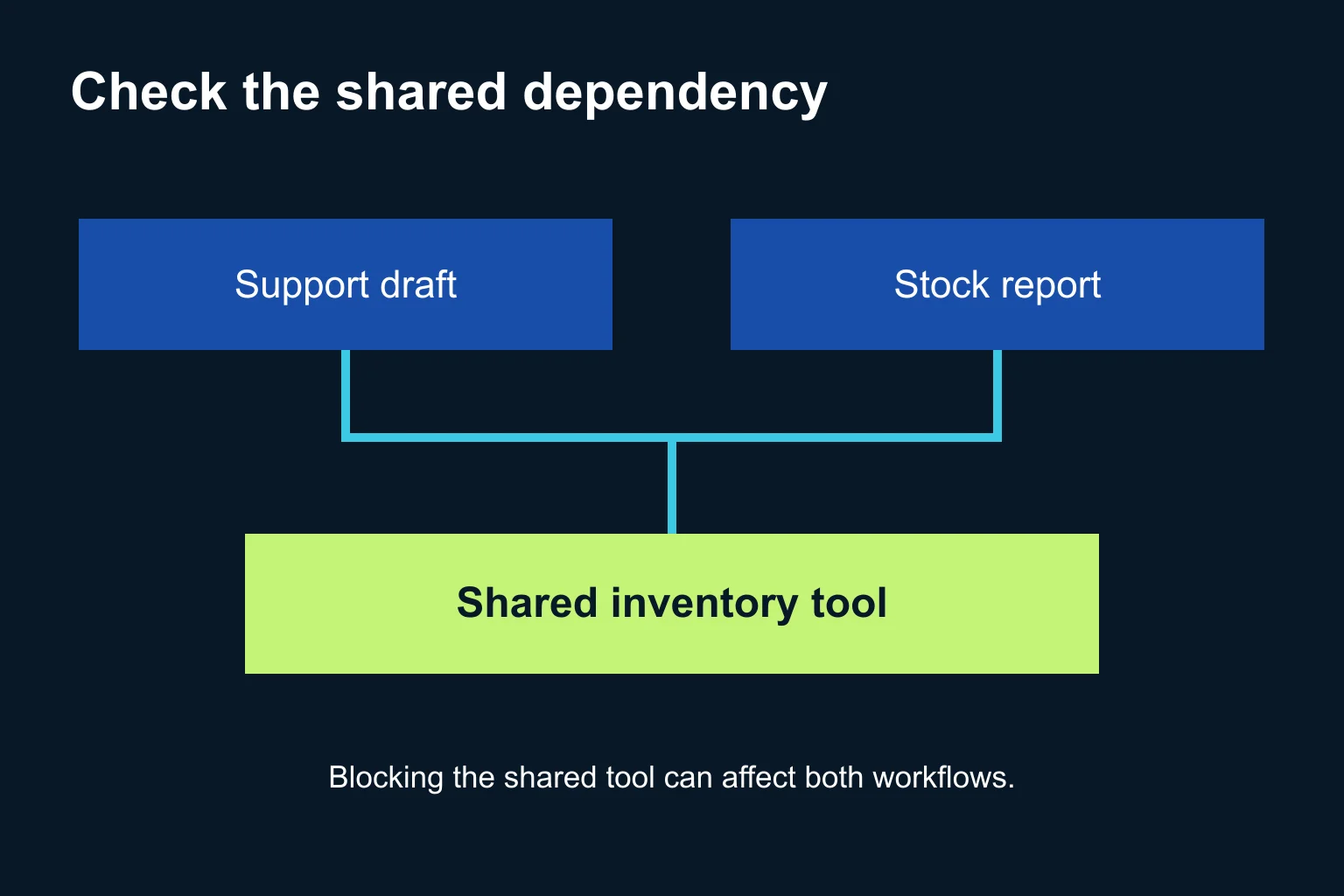
Here is a fictional example. A support assistant and a weekly stock-report agent both use the same inventory service. The support pilot needs read-only lookup. A newly introduced write action is not yet approved.
A blanket service block could interrupt the report as well as the pilot. The appropriate decision might instead be to keep the pilot unconnected until a supported read-only boundary is verified. Where an appropriate granular control exists, the administrator can test that boundary in a small scope. The right choice depends on the actual application permissions and management route, not on the diagram alone.
Which of three routes should our business take?
1. Start with an owner-reviewed inventory. If you have a few assistants and no dedicated administration project, list each workflow, owner, tool, permitted action and fallback. Keep the list in an existing shared document. This is useful even when you do not license Agent 365. The list records decisions; it does not enforce them.
2. Use the existing Microsoft administration route. If your organization already has the relevant licensing and administrators, choose one supported tool and inspect its dependent workflows. Record the current setting before making a small, approved change. Verify both the intended restriction and the tasks that should continue working.
3. Coordinate a mixed-platform review. If agents live in several systems, use supported platform connections or a scoped custom integration where necessary. Microsoft documents that connected-platform coverage varies, synchronization is currently manual and registry synchronization does not itself add code-level capabilities. A connected inventory should therefore have a recorded refresh time. Connected platforms documentation.
A connector or MCP connection provides access to capabilities; it is not a scheduler. A custom scheduled check needs its own trigger, limited credentials and an owner. Do not build a new dashboard until the existing views fail a specific business need.
What can we do this week?
Use this six-step action checklist for one non-critical workflow:
- Name the business outcome. Identify what the agent produces, who uses it and what should happen if it cannot run.
- Name an accountable person. Record the business owner and the administrator who can change access. Avoid ownership recorded only as a team mailbox.
- Map the dependency. List the agent, plugin or skill, MCP server or connector, and underlying application. Mark which relationships are confirmed and which still need investigation.
- Separate actions. Write down what should be readable and what must remain unavailable, such as editing stock quantities. Check actual permissions rather than relying on a descriptive name like “read assistant.”
- Test both sides of the boundary. In an authorized test scope, confirm that a permitted task succeeds and a prohibited action is denied. Also run a second workflow that shares the dependency and is supposed to remain unaffected. Retain the result and time of the test.
- Approve expansion or restore the prior setting. Have the owner review the evidence. If the boundary is unclear, stop the pilot and keep the existing workflow available through its established fallback.
This is a proposed evaluation method, not a vendor guarantee or a request to run destructive tests in production. No customer message, purchase or stock update is needed to prove the initial inventory is accurate.
What should the review record contain?
| Field | Example for the fictional pilot |
|---|---|
| Business job | Prepare a support draft using approved stock information |
| Owner | Named support operations owner |
| Shared dependency | Inventory lookup service also used by a report |
| Allowed action | Read availability for approved products |
| Restricted action | Change stock quantities |
| Evidence | Test time, result and administrator’s confirmed control scope |
| Fallback | Human lookup in the existing business application |
Keep secrets and raw customer records out of this review sheet. Store references to approved logs rather than copying sensitive prompts into a broadly shared document. A green inventory status is not evidence that the business task produced a correct answer.
For related operational checks, see how to restart workflows after an outage and how to define application acceptance tests.
When does Ergonya help?
An existing inventory and one responsible administrator may be enough for a small pilot. Ergonya helps when business workflows span systems and the team needs a clear dependency map, proportionate permissions and evidence that an automation behaves as intended.
Discuss an AI transformation pilot with Ergonya. Bring one workflow, the tools it touches and the action you want to control. Start with a reviewable boundary before expanding access across the business.